
My Current iPhone Driven iOS App Development Workflow
After I published my previous posts about the skill being in the workflow and building Hermes Mobile from my iPhone, I was asked to share the concrete workflow behind it.
Not the high level version. Not “I use agents and sometimes work from my phone.”
The actual current setup: how I connect to the Mac, how I split work between agents, how I test iOS changes when I am not sitting at the machine, and how I try to avoid merging code just because an agent says it is done.
So this post is a snapshot of my current iPhone driven iOS app development workflow.
I am intentionally saying current. Workflows around AI agents are changing very fast. This is what mine looks like in June 2026. It may look different in a month.
The project in this example is Hermes Mobile, a native SwiftUI iOS client for Hermes Agent. That makes the whole thing a little meta: I am building a mobile client for an agent system while also using a mobile-first workflow to supervise the agents building it.
The short version
My Mac is still the machine doing the work.
The iPhone is the control surface.
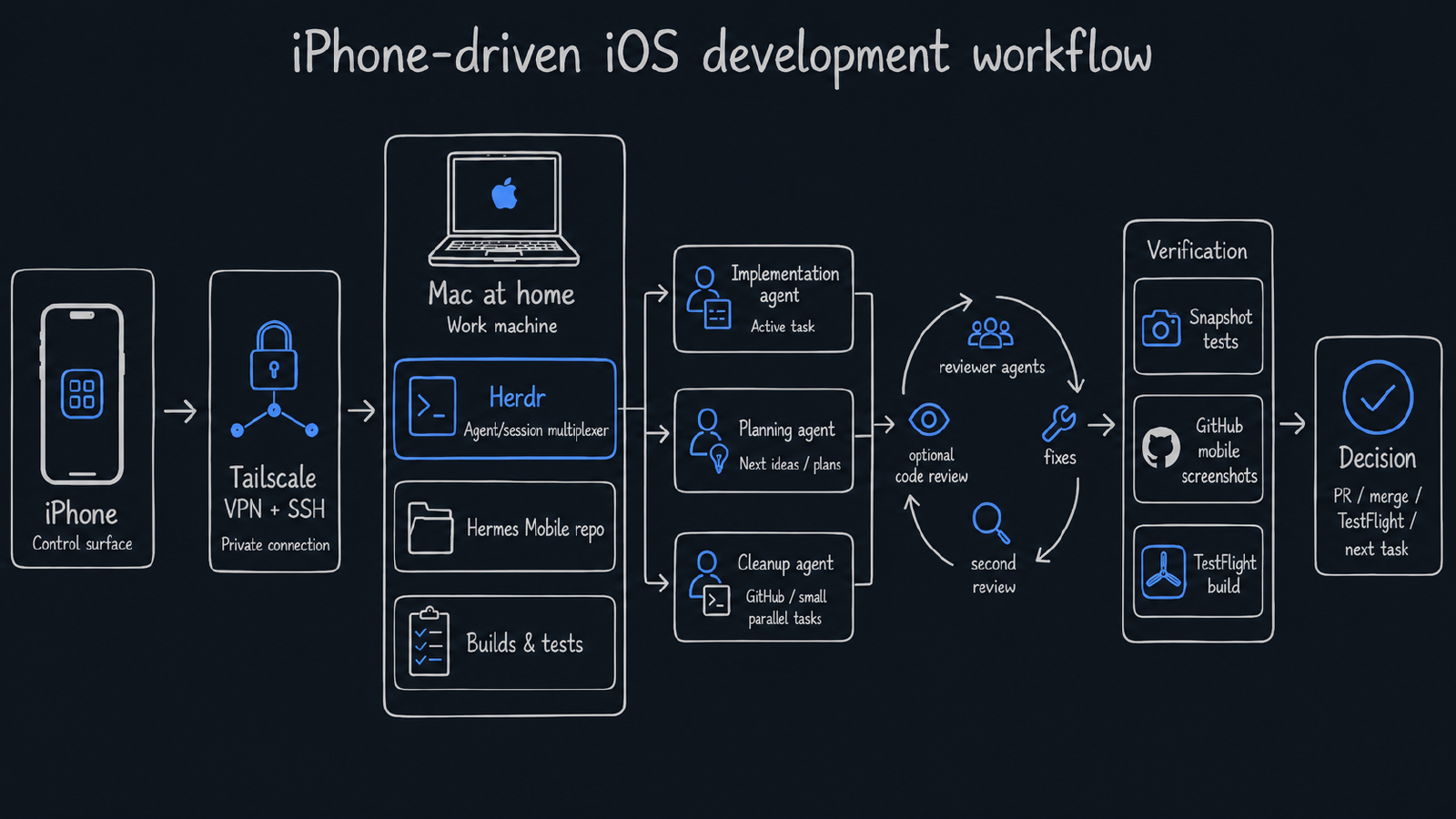
On the Mac I run the repo, coding agents, builds, tests, and Herdr. From the iPhone I connect to the Mac through Tailscale VPN and SSH, using the Moshi iOS app. Once I am in, I open an already running Herdr session and switch between workspaces and agents from there.
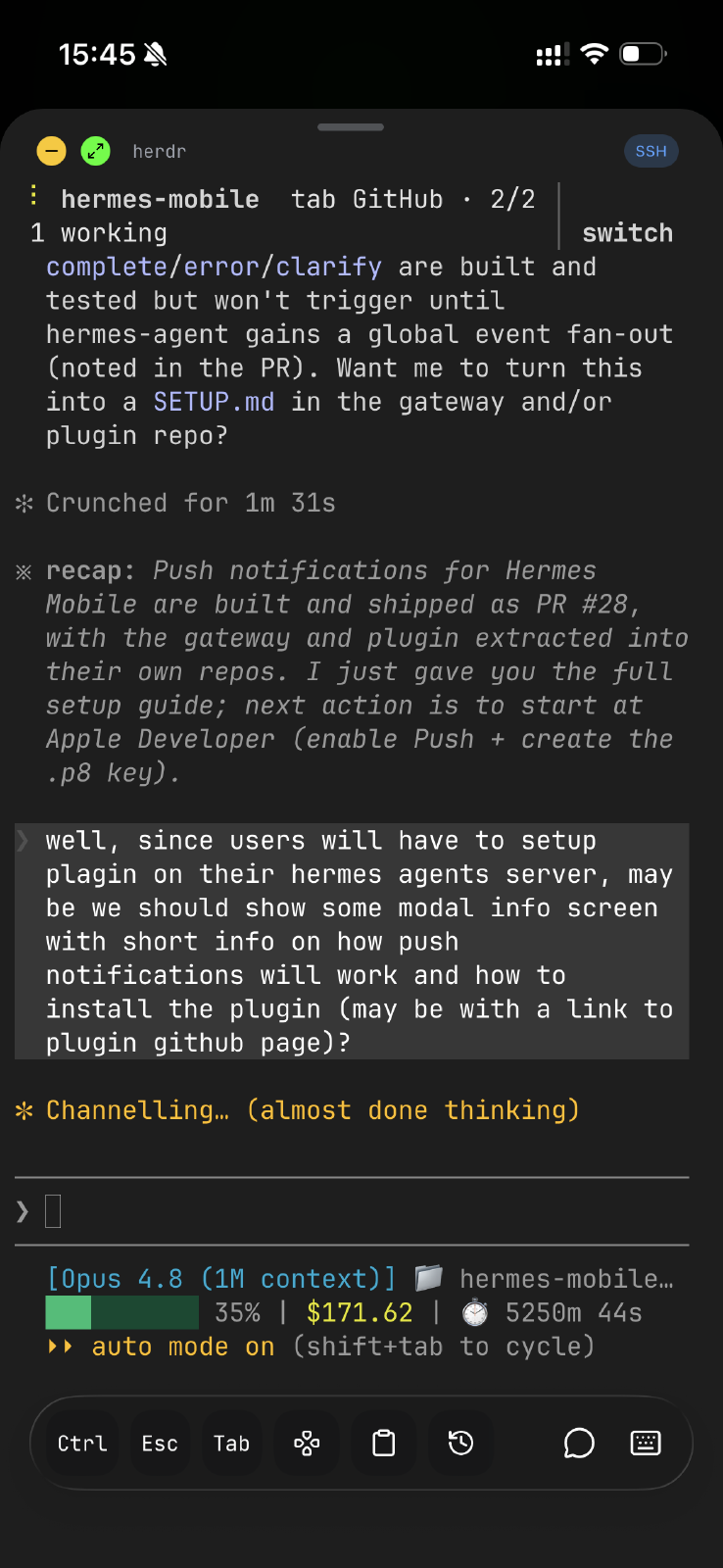
For Hermes Mobile I usually have two agents running, sometimes three:
- one agent working on the active implementation task;
- one agent for brainstorming, planning, or preparing future work;
- sometimes a third one for cleanup, GitHub issue work, or another small task that can safely run in parallel.
That is enough. More agents can easily turn into management overhead if the tasks are not prepared well.
Why I ended up with this setup
I started with remote control of Claude Code. That worked fine for sessions that were already running. I could jump back into a live session from the phone and keep going.
The problem was that I could not spawn new sessions when I needed them. If I wanted to start a fresh agent on a new task, I was stuck until I was back at the Mac. For a workflow where I want to kick off planning or cleanup work on the spot, that was the biggest limitation.
Herdr became the layer for that. It gives me one place on the Mac where agent sessions can keep running, and from the phone I can jump into the relevant workspace instead of starting from scratch every time.
The iPhone connects through Moshi over SSH. Tailscale gives me a private network path to the Mac, so I do not need to expose this setup to the public internet. This is important. I treat this as a private tailnet workflow, not a generic remote coding setup that I would leave open anywhere.
I am not really developing Hermes Mobile through the Mac UI at all. Everything happens in the terminal through Herdr. Even when I am at the Mac doing my contractor work, I check on Hermes Mobile by jumping into its Herdr session, not by opening Xcode or some app window. From the phone it is the same Herdr layer, just over SSH.
So I am supervising work, not sitting in front of the project. That changes the whole feedback loop.
The planning loop matters more than the agents
The agents are useful only when the work is shaped well.
For Hermes Mobile I usually have plans prepared from earlier brainstorming or planning sessions. Then I run an execution command for one of those plans. If you want to see what the output of that brainstorming and planning actually looks like, the completed plans are checked into the repo.
A plan has multiple tasks. The rule I try to keep is simple:
One task should become one commit.
That gives me a clean trail of what changed and makes it easier to review or revert later. It also forces the implementation agent to work in smaller slices instead of trying to turn one vague request into a giant diff.
The implementation agent works through the tasks, commits each finished piece, and then the review loop starts.
This part is easy to skip when you are excited that the agent produced working code. I try not to skip it.
The review loop before I trust the result
At the end of an implementation run, the workflow spawns several reviewer agents. Their job is not to praise the implementation. Their job is to find problems.
They review the changes from different angles and send feedback back to the main orchestrator agent. The orchestrator then fixes the issues and runs another review session to verify the fixes.
Sometimes a Codex code review is part of that loop too, adding a couple of extra iterations from its feedback. Not always. If the change is small, that may be too much. But for bigger changes it is useful to have another model inspect the work.
Only after this loop finishes do I decide what happens next:
- make a TestFlight build for manual testing;
- open a pull request;
- merge directly to main;
- or move to the next ticket.
The important part is that “agent finished” does not mean “I trust the code.”
It means the work is ready for review.
Testing an iOS app when the Mac is remote
Because I am supervising through Herdr rather than driving Xcode directly, I do not rely on the local simulator the way I normally would in a classic desktop iOS workflow.
Manual testing goes through TestFlight builds.
That is slower than local simulator iteration, but it matches the real workflow: I install the build on the iPhone and test the app as a user. For Hermes Mobile that is especially useful, because the whole product is about using Hermes from the phone.
For visual checks I rely heavily on snapshot tests.
If I need to verify a particular screen or state, I can ask the agent to generate a snapshot. Then I can review the screenshot from the GitHub mobile app.
There is one awkward detail here. Right now there is no way to view images directly in the Moshi SSH terminal. So if I need to inspect an image, I either check it through GitHub on the phone or ask the Claude Code remote-control session to put the screenshot into the Claude chat, then open it in the Claude iOS app.
This is clunky, but it works.
And the clunkiness is useful product research. If Hermes Mobile is supposed to become a better mobile control surface for agents, these are exactly the kinds of rough edges I want to feel directly.
What works well
The biggest benefit is that Hermes Mobile keeps moving even when I am not sitting in front of the Mac.
This matters because it is a side project. I have contract work, family, and normal life around it. I cannot depend on long uninterrupted desktop sessions for every bit of progress.
The workflow helps in a few ways.
First, because the sessions live in Herdr on the Mac, I can pick the work back up from anywhere, on the Mac or on the phone, whenever I want. Nothing is tied to a single device or a single sitting. I step away, and the same session is waiting where I left it.
Second, planning and implementation can happen in separate sessions. One agent can prepare or refine future work while another one executes a current task.
Third, the commit-per-task rule makes the output easier to inspect. I do not want one huge “agent did stuff” commit.
Fourth, snapshot tests give me mobile-visible evidence for UI changes. I can check a screen from GitHub on the phone, without needing a simulator in front of me at all.
Fifth, the review loop catches enough issues that my attention is spent on product judgment and final verification, not on being the first and only reviewer of every generated diff.
It does not remove me from the loop. That is not the goal.
The goal is to make my attention the bottleneck only where it should be the bottleneck.
What is still awkward
This setup is not smooth in the way a polished demo would make it look.
Visual review from a terminal app on the phone is still awkward. Right now there is no way to view images inside the Moshi SSH session at all, so any screenshot has to be checked somewhere else. That is exactly why I end up moving between Moshi, GitHub, TestFlight, and Claude just to verify one UI state.
TestFlight is slower than a local simulator. That is fine for manual validation, but too slow for tight UI iteration.
Parallel agents need discipline. If I start too many sessions without clear plans, I just create more things to supervise. Two agents are often enough. Three is already a lot for a side project if I want to understand what is happening.
The final product decisions still have to be mine. An agent can implement a screen or fix a bug, but it cannot tell me whether the app is becoming simpler or more confusing for the kind of workflow I actually want.
Why this matters for Hermes Mobile
The current setup is also a reminder of why Hermes Mobile exists.
Right now I can control agents from the phone, but the workflow is assembled from several pieces: Tailscale, SSH, Moshi, Herdr, GitHub, TestFlight, Claude, and the Hermes server itself.
It works. But it is not native to the way I want to use agents from mobile.
That gives me a useful feedback loop. Every annoying part of the workflow becomes a possible product lesson for Hermes Mobile:
- approvals should be easy to notice and answer from the phone;
- visual output should be easy to inspect;
- tool activity should be understandable without reading terminal noise;
- reconnects should not lose important pending prompts;
- session switching should feel natural on mobile;
- the app should help me decide what needs my attention now.
This is why dogfooding matters. The product is not an abstract mobile client. It is being shaped by the workflow I am using to build it.
The current version of the workflow
If I reduce it to its two parts, it looks like this.
How I reach the work:
iPhone (control surface)
  -> Tailscale VPN
  -> SSH through Moshi
  -> Mac running Herdr
What actually runs on the Mac:
Herdr
  -> multiple agent sessions / workspaces
  -> Hermes Mobile repo
  -> plan -> commit-per-task -> review loop
  -> snapshots and tests
  -> GitHub / TestFlight for verification
The phone is just the way in. The Mac is where the loop lives.
That is the current version.
It is not final. I do not expect it to stay final for long.
But it is working well enough to keep a real iOS side project moving from the phone, with the Mac doing the heavy work and agents handling prepared, reviewable slices.
For now, that is the point.