
Hermes Mobile Is Now in Public Beta! Push Notifications for a Self-Hosted Agent
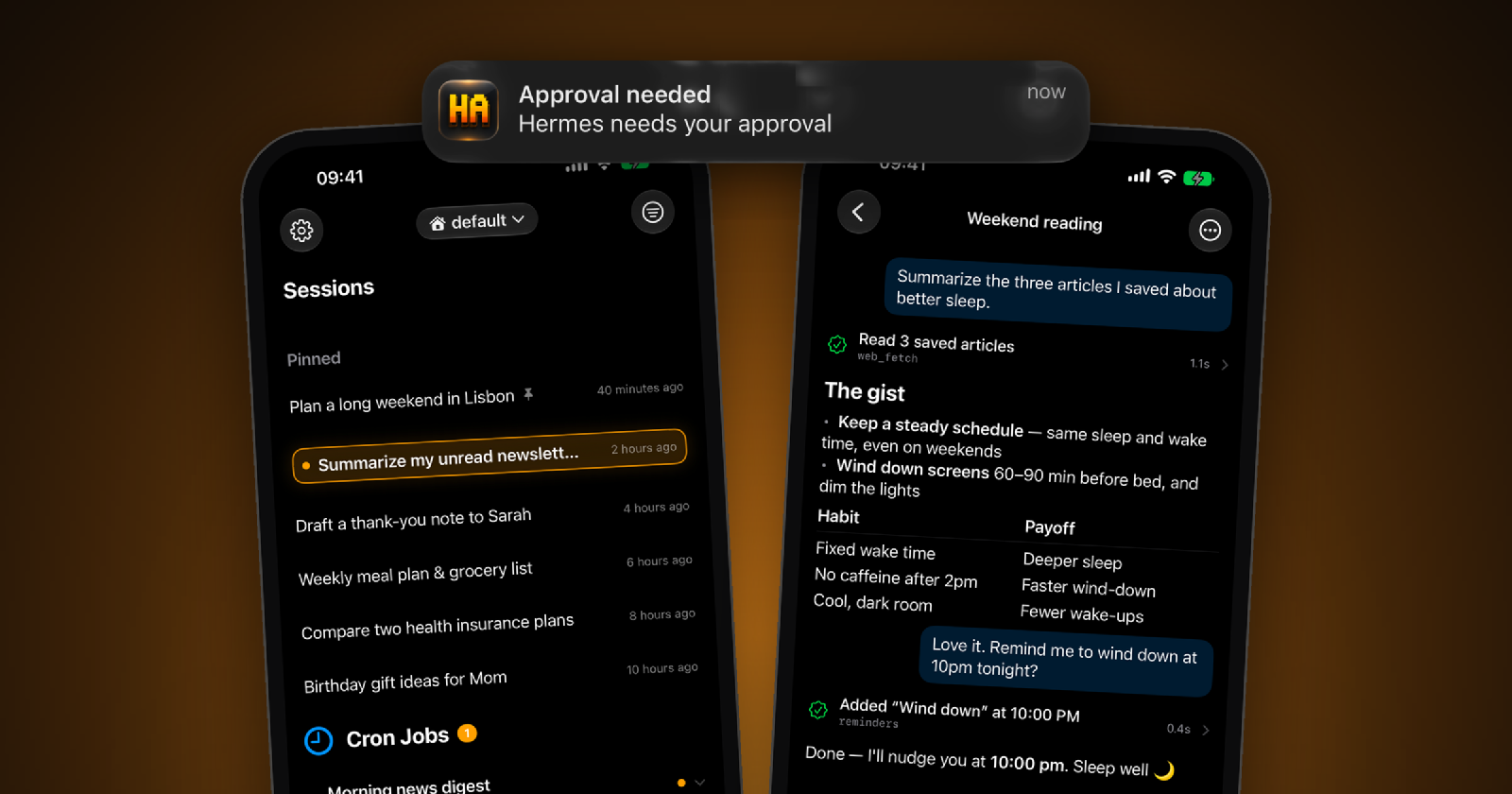
Hermes Mobile is now available as a public beta.
It is a native iOS companion for Hermes Agent. Hermes keeps running on your own Mac or server, while the iPhone gives you a native way to browse and resume sessions, follow tool activity, answer approvals and clarify prompts, and check on longer-running work away from the desk.
Join the Hermes Mobile public beta on TestFlight
You will need a running Hermes Agent instance that your phone can reach. Hermes Mobile supports both static-token access and username/password login when the Hermes dashboard is configured with an authenticated user, so Tailscale is not strictly required. I still strongly recommend reaching the agent through a private network such as a Tailscale tailnet instead of exposing it directly to the public internet whenever possible.
The project is also open source on GitHub. The beta is still meant for people comfortable with Hermes and self-hosted tools, but it is ready for more setups than my own. I especially want to learn whether it can replace Telegram or terminal-based check-ins for day-to-day Hermes use.
I have already written about building the first version of Hermes Mobile from my iPhone and the agent workflow I currently use to keep it moving. This time I want to cover one of the features I considered necessary before opening the public beta: push notifications.
Without push notifications, Hermes Mobile had better chat and session management, but it still lost to Telegram at a basic mobile job: bringing me back when the agent needed me. Telegram already notified me about every new chat message. Hermes Mobile still required me to open it manually to discover whether an approval or clarify question was blocking a turn, a longer task had finished, or the agent had hit an error.
With those notifications in place, Hermes Mobile starts to feel less like Hermes inside another chat app and more like a native mobile control surface. That was the day-one beta experience I wanted.
Adding push notifications to an iOS app sounds like a small feature. Register for notifications, send a payload to APNs, handle the tap.
That is roughly true when you own the app and the backend.
It gets more complicated when every user runs their own backend and the publisher must never give that backend the private key used to send Apple push notifications.
The notification itself was straightforward. Almost everything around it was not.
Why a self-hosted agent changes the design
Hermes Agent runs on the user’s own Mac or server. Hermes Mobile can connect with a static dashboard token or use username/password login when the dashboard has authenticated access configured. In my setup the connection usually goes through Tailscale, which is still the approach I recommend, but a private tailnet is no longer a hard requirement of the app.
Apple push notifications need an APNs signing key tied to the app publisher’s developer account. I cannot put that key inside an open-source plugin and ask every user to install it on their machine. Anyone who extracted it could send notifications as my app.
The feature therefore became three separate pieces:
- a Hermes plugin on the user’s machine decides when a notification should be sent;
- a small stateless Cloudflare Worker keeps the APNs key and forwards notifications to Apple;
- the iOS app registers its device token with the user’s Hermes instance and opens the correct session when the notification is tapped.
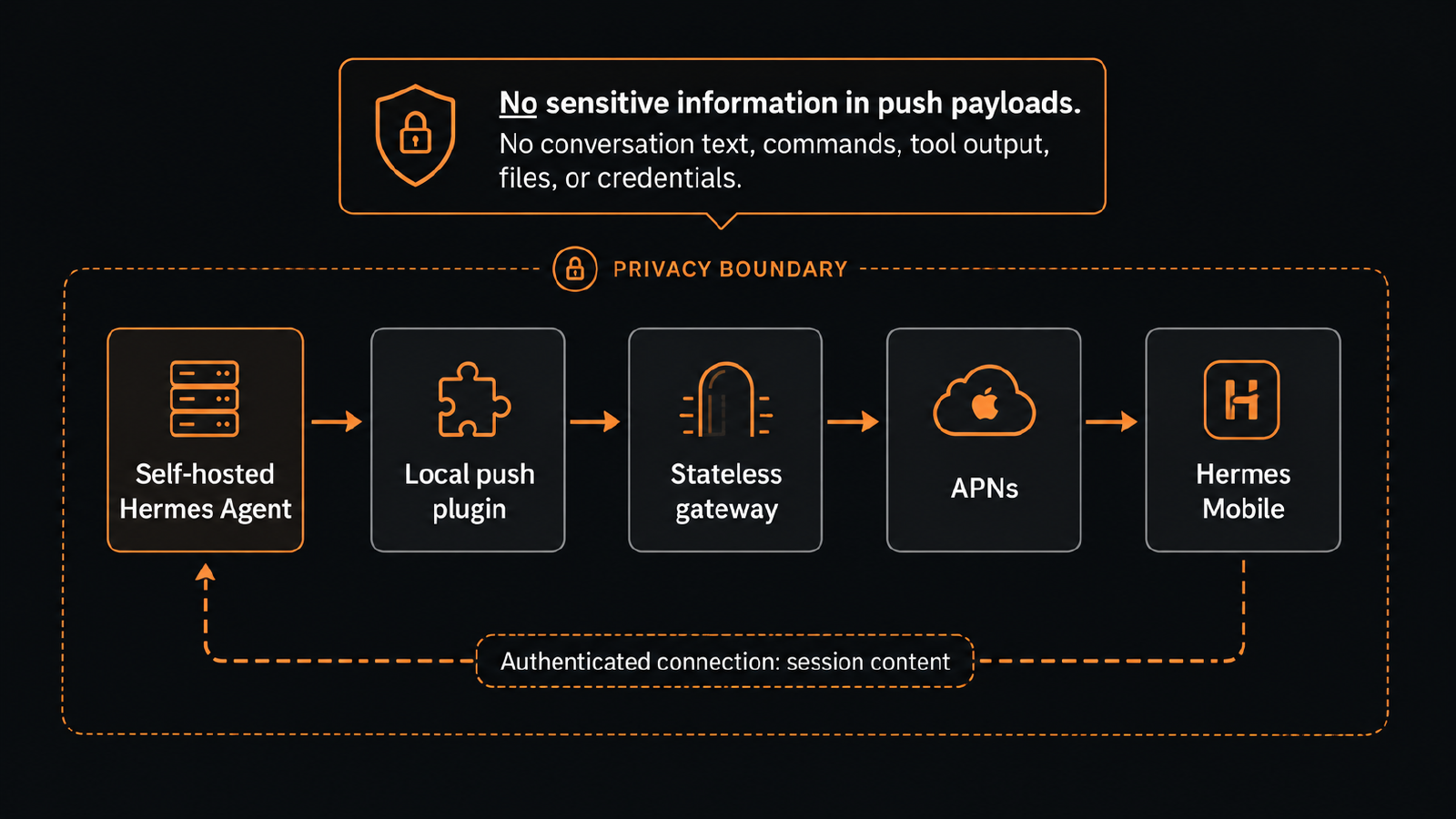
At a glance, the push path is:
Hermes Agent -> local push plugin -> stateless gateway -> APNs -> Hermes Mobile
The full session follows a separate path: Hermes Mobile loads it directly from the user’s authenticated Hermes instance.
Push notifications contain no sensitive information: no conversation text, command details, tool output, files, or credentials. Only generic notification text and the session ID needed for routing pass through the gateway. The actual conversation and command content stay on the user’s machine and are loaded by the app over the user’s private connection.
The design made sense. Then the handshakes started failing.
The first security design could never work
The first version gave every registered device its own HMAC secret. The plugin would sign each push request with that secret, and the stateless gateway would verify it.
There was one problem: the gateway had never seen the per-device secret.
The plugin and gateway each passed their own unit tests because each side tested with the secret it expected. Put the two implementations together and every request would return 403.
The replacement design is based on a device-scoped capability. The gateway derives it from its own secret and the device token:
HMAC(gateway_secret, device_token)
The plugin fetches that capability during registration and presents it when sending a push. The gateway secret never leaves the gateway. If one capability leaks, it can only be used to notify the device it belongs to.
That was the first useful lesson from this feature: components can be well tested and still implement incompatible versions of the same contract.
The hooks I expected were not the hooks I needed
The next assumption was that Hermes would have one clean event for “the agent needs the phone.”
It did not.
The first hook I tried, pre_gateway_dispatch, handled incoming messages. It did not see finished turns. A loopback WebSocket path also failed to observe the events I needed, so it added another connection without solving the problem.
The working mapping came from reading through Hermes Agent’s hook system:
approval      -> pre_approval_request
turn complete -> post_llm_call
error         -> on_session_end
clarify       -> pre_tool_call, filtered to the clarify tool
Long-turn notifications are also gated so quick chat replies do not keep buzzing the phone.
Once the real hooks were in place, the loopback WebSocket path could be deleted. Reading the host application’s implementation earlier would have saved time here. The API I had imagined was tidier than the one that existed.
pip install was only half an installation
The original distribution plan was a normal Python package. Install the notification plugin with pip, restart Hermes, and continue.
That would have produced a plugin that appeared to work while silently missing an essential part.
Hermes could load the package’s hooks, but plugin HTTP routes were discovered by scanning plugin directories under ~/.hermes/plugins/. A package installed into the Python environment was not scanned for those routes. The hooks would load, but the device-registration endpoint required by the iOS app would not exist.
The plugin had to be structured and installed as a Hermes directory plugin instead. The verification also had to use Hermes’s real loader rather than only importing the Python package in a test.
“Installed” and “wired into the host” turned out to be two different states.
The test button said sent. Nothing arrived.
The hardest failure to diagnose appeared on a real iPhone through TestFlight.
Notification permission was granted. The device was registered. The app’s settings screen had a test button. Tapping it returned “Test notification sent.”
Nothing arrived.
The success message was the first problem. The request was fire-and-forget, so the UI reported success when work was dispatched rather than when APNs accepted anything.
Following the request across the system narrowed it down:
- The TestFlight build correctly registered for the production APNs environment.
- Cloudflare Worker logs showed no
/pushrequest. - The plugin had never cached the device capability it needed before sending.
- The agent log showed that capability registration returned
403. - A manual
curlrequest to the same URL and with the same body worked.
The difference was the User-Agent header.
Cloudflare Bot Fight Mode rejected Python’s default Python-urllib/3.x user agent before the request reached the Worker. curl passed through. Adding an explicit user agent to the plugin request fixed the registration flow, and notifications started arriving.
The test endpoint was changed too. It now waits for the real result and returns the per-device delivery status or error. The UI no longer claims that a notification was sent merely because an asynchronous task started.
One session had two different IDs
After delivery worked, tapping a finished-turn notification opened the correct chat. Tapping an approval notification opened the session list.
Both notifications followed the same routing code. Their payloads did not contain the same kind of identifier.
The finished-turn hook had the real session_id, which is what Hermes Mobile uses to open a chat. The approval hook provided a session_key, a source-derived identifier that can differ from the session ID after a session is resumed.
The plugin already sees the real session ID earlier in the turn, so it now keeps that value and uses it for later approval notifications. The old key remains only as a fallback.
This was a small bug with a familiar cause: producer and consumer both said “session,” but they meant different identifiers.
A notification can arrive after its event is gone
The last problem sat on the boundary between the mobile app and Hermes Agent.
Approval requests are delivered as live events. If the app is connected when an approval fires, it receives the event and can show the full approval card. If the app connects afterward, Hermes does not replay the pending request. The push notification can reach the phone, but opening the session does not recreate an event the client never saw.
The correct long-term fix belongs in Hermes Agent: when a client resumes a session, the server should expose or replay pending approvals. I documented the behavior and proposed fix in issue #30.
The current iOS build now has a limited fallback while that server-side fix is pending. When the user taps an approval notification, Hermes Mobile restores the session and checks whether the turn is still running. If no real approval event arrives, it shows a generic approve-or-deny card.
The fallback is deliberately constrained:
- it cannot show the command because command content never passes through the push gateway;
- it does not offer “approve all” for a command it cannot display;
- it checks the server’s resolved count, so an approval already handled elsewhere becomes “Already handled elsewhere” instead of a false success;
- it cannot recover clarify requests because those need a request ID that only exists in the original event.
This does not remove the need for the upstream fix. It gives the mobile user a safe path for the most important missed prompt without pretending the client has information it never received.
What these failures had in common
None of the six problems was in the code that asks iOS to display a notification.
They were all between systems:
- the plugin and gateway disagreed about authentication;
- the hooks did not emit the events I assumed they emitted;
- the package loader and route loader followed different installation paths;
- Cloudflare rejected the HTTP client before the Worker saw it;
- two session identifiers looked interchangeable but were not;
- the push arrived even though the live approval event was already gone.
That changed how I think about testing this kind of feature. A unit test around each component is necessary, but the highest-risk code is often the contract between them. The useful tests need to cross those boundaries: real loader, real registration flow, real gateway response, production APNs environment, real notification tap, and session restoration afterward.
The notification was the easy part. The handshakes were the work.
Try the Hermes Mobile public beta
Push notifications turn Hermes Mobile into an actual mobile control surface. The agent can ask for approval, request clarification, finish a longer task, or hit an error while the app is closed, and the phone can bring you back to the relevant session.
Hermes Mobile is still aimed at people who already run Hermes Agent and are comfortable with a self-hosted setup. It supports static-token access and username/password login to an auth-gated Hermes dashboard, so it can work without Tailscale. A private network such as a Tailscale tailnet remains the setup I recommend because exposing an agent with access to tools and local resources directly to the public internet adds unnecessary risk.
Join the Hermes Mobile public beta on TestFlight
The repository is open source if you want to inspect the implementation, report a problem, or follow development.
For this beta, I am most interested in whether Hermes Mobile can replace Telegram or terminal-based check-ins for day-to-day Hermes use. I also want to find where approvals, clarify prompts, notifications, authentication, and reconnects still break under setups other than mine.